Case study 02 · AI & operating model
Redesigning the UX Process with AI
From individual experiments to repeatable UX workflows the whole product team can rely on.
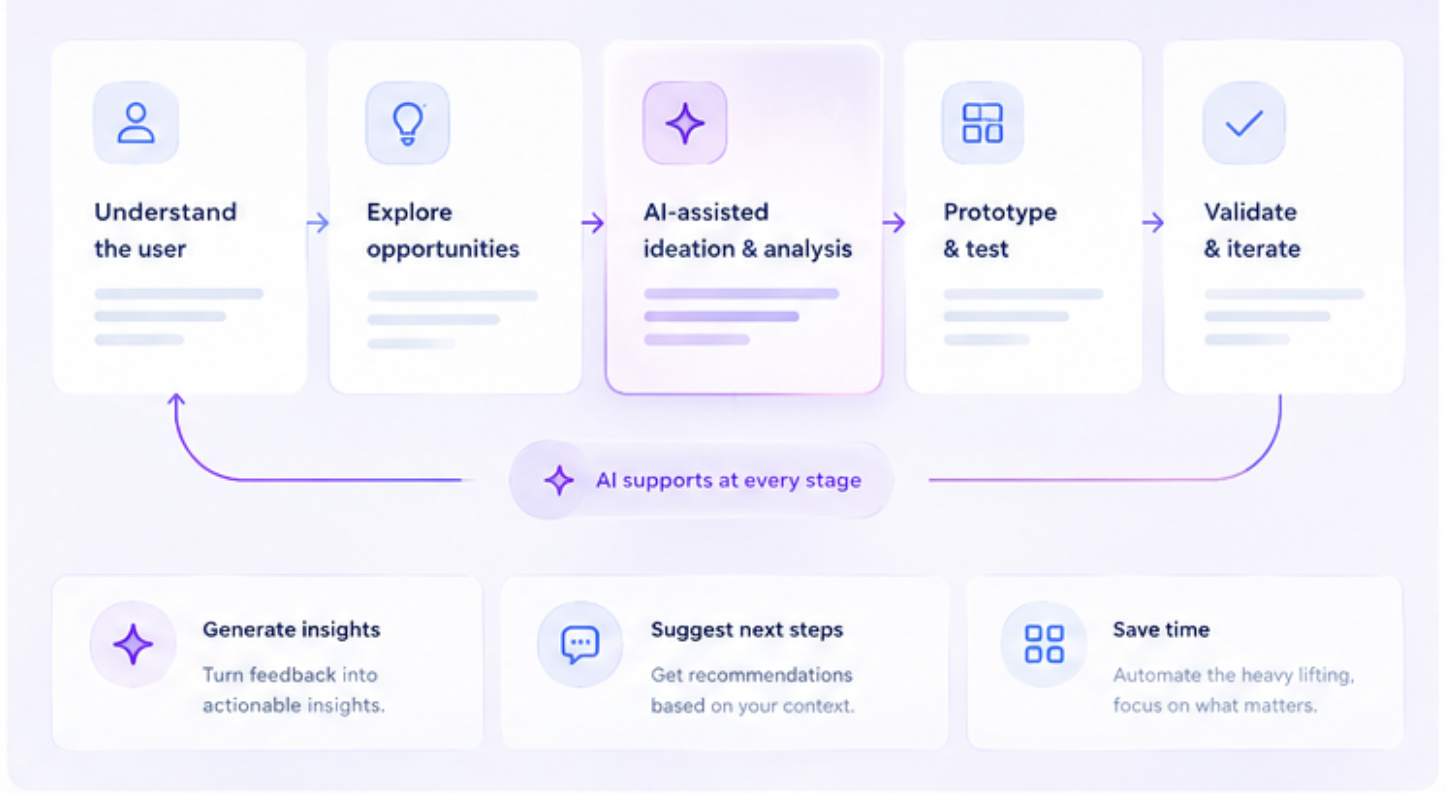
Challenge
AI adoption was growing through individual experiments, but workflows were fragmented, outcomes inconsistent, and knowledge difficult to scale across the team. The challenge was to turn AI usage into a repeatable operating model without removing human judgement.
My role
Defined the strategy and operating model, piloted tools and workflows, and led adoption across the UX team.
The starting point
Three workstreams, redesigned with AI
Design system
Reduce manual component work and improve consistency between Figma and Storybook.
Explore →Product flows
Accelerate the path from concept to validated flow, then to frontend-ready specifications.
Explore →Sales enablement
Create tailored, high-fidelity demos faster for prospect conversations.
Explore →
All of this runs through an intermediary layer between Claude Code and Figma — see how it works.
01 · Design system
Update, create and maintain
Reduce manual component work and improve consistency between Figma and Storybook.
Existing components
- 01
Identify the design / build gap
ChatGPT + Figma MCP
Inspect the current implementation, surface gaps vs. Storybook, and suggest improvements based on best practices.
- 02
Apply systemic updates at scale
Claude Code + Figma API
Batch-edit across components when a token, property or interaction rule changes.
- 03
Generate engineering handover
ChatGPT + Figma MCP
Produce a precise dev handover with the exact changes to make — cutting down back-and-forth with engineering.
- 04
Detect drift during QA
ChatGPT + Figma MCP
Catch drift between design and built components.
New components
- 01
Live iteration
Claude Design
For complex components, iterate live with Claude Design — aligning on behavior and key properties before locking visuals.
- 02
Detailed spec
Claude Design → Claude Code + Figma API
Hand off to Claude Code to produce the detailed design specification directly in Figma.
- 03
Final refinement
Manual + Claude Code
Manual fixes and/or a Claude Code pass for final polish — the human stays in the loop on the last mile.
Automated maintenance
Coming next- 01
Regular compliance audit
Figma ↔ Storybook
Continuous drift detection between design and built components.
- 02
Auto Figma creation & update
Triggered after a request, with a manual validation step before merge.
- 03
Automatic Storybook update
Push approved Figma changes through to Storybook with no manual port.
02 · Product flows
From concept to frontend code
Accelerate the path from concept to validated flow, then to frontend-ready specifications.
- 01
Concept iteration
Claude Design / Figma Make
Explore solution directions with Claude Design.
- 02
Feedback collection
ChatGPT / Claude
Generate the research protocol and analyze post-session insights, with manual review.
- 03
Hi-fi happy path
Claude Design → Claude Code + Figma API
Build the high-fidelity happy path from the validated concept.
- 04
Refinement
Manual + Figma Make
A human pass to catch nuance the model misses.
- 05
Edge & error cases
Claude Design + Figma API
Generate edge and error cases from the locked happy path.
- 06
Frontend code generation
Figma → code
Automated frontend code generation from the Figma design specification.
The goal is not autonomous design: it is a faster loop in which Product, Design and Engineering collaborate earlier.
03 · Sales enablement
Create future-state demos faster
The goal: help Sales show credible future-state product experiences without waiting for production-ready features.
- 01
Concept iteration
Claude Design / Figma Make
Brainstorm future concepts on top of real product patterns.
- 02
Hi-fi interactive prototype
Builder IO · HTML prototype needed to integrate with Reprise
Build a high-fidelity, interactive prototype to showcase to prospects.
- 03
Client-specific updates
Builder IO + Reprise
Adapt the prototype to a specific prospect's context and data, so sales can personalize with minimal UX support.
04 · How to
The intermediary layer
Scaling AI required more than connecting tools. It required a controlled layer that could make outputs reliable, governable and reusable across the team.
The extra layer
the intermediary layer
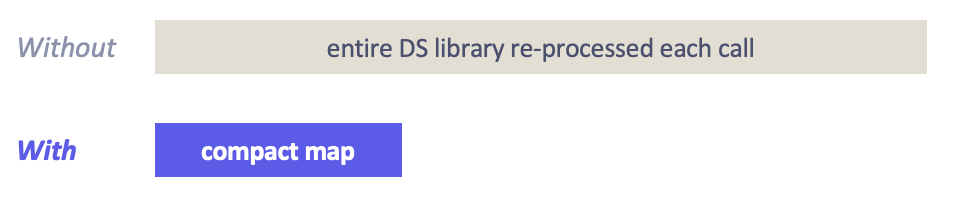
Abstraction layer
AI doesn't have to rediscover the system every time.
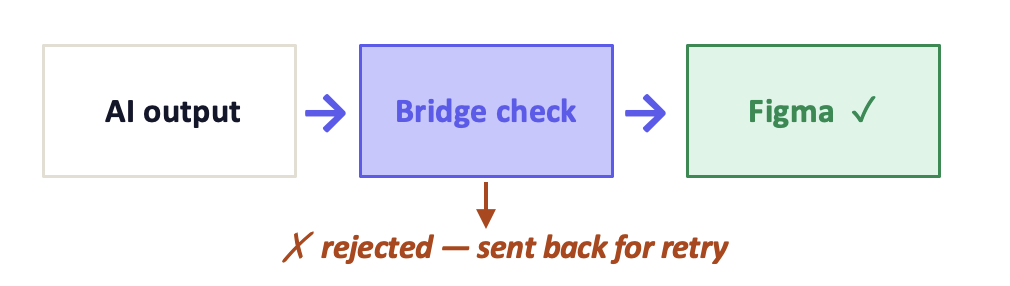
Validation
Hallucinations are caught before they reach Figma.
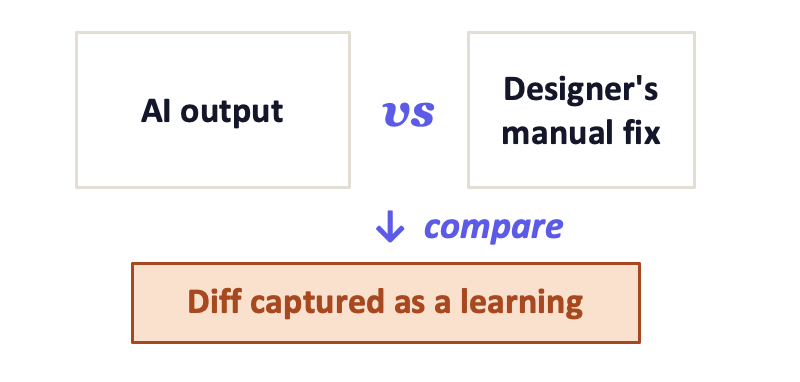
Learning
Capture the difference between AI output and manual correction.
The outcome
The shift that unlocks the next level
The next level wasn’t more AI usage. It was moving from individual experimentation to repeatable team workflows — bringing Product, Design and Engineering together earlier around a stronger Design System foundation.
100%
UX team adoption
10×
faster prototyping
81%
reported more innovative solutions
The result: a repeatable AI operating model, not a collection of individual experiments.
Next case study